
Overview
Description
The TB-S1JA Target Board Kit features the ultra-low power, 48MHz Arm® Cortex®-M23 core S1JA microcontroller (MCU) Group that integrates best-in-class programmable analog and security functions for high-accuracy sensor signal acquisition and conditioning. Users can experience the full features of the Synergy™ S1JA MCUs with access to all pins, standardized expansion ports, and preinstalled demo software.

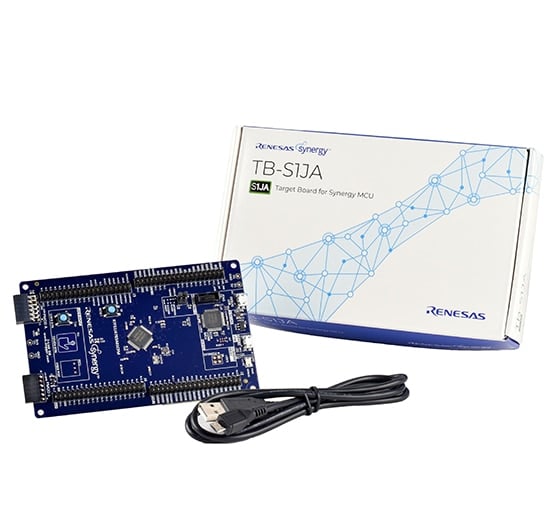
Features
- Access all pins and on‑board peripherals of the Synergy S1JA MCU Group
- Accelerate code development with the tightly integrated and qualified Synergy Software Package (SSP)
- View, step through, and debug code using the Renesas e² studio IDE or IAR Embedded Workbench® for Renesas Synergy
- Flexible connectivity options with USB and a Pmod™ connector, enabling rapid prototyping with plug‑in modules
- Best‑in‑class analog solution featuring a 16‑bit SAR ADC, 24‑bit sigma‑delta ADC, 12‑bit DAC, analog comparators, and operational amplifiers
- Human machine interface (HMI) functionality with a capacitive touch sensing unit (CTSU) and user push buttons
- Monitor system status and test functionality using programmable LEDs, capacitive buttons, or mechanical buttons
- Measure real‑time power consumption during program execution
- Operate using high‑precision on‑board crystals or a lower‑precision internal clock
- Security and encryption functions enable secure data communication and storage, with support for industry‑standard algorithms such as AES‑128 and AES‑256
- Safety features include hardware diagnostics, memory protection, and watchdog timers
- Debugging and programming supported by on‑board J‑Link® OB
Applications
Documentation
|
|
|
|
|---|---|---|
| Type | Title | Date |
| Quick Start Guide | PDF 169 KB 日本語 | |
| Application Note |
PDF
61 KB
AI-generated Summary:
The document provides a comprehensive look-up table for Synergy MCU Kits, listing current and new orderable part numbers to assist customers in ordering through distributors. It emphasizes precautions for handling microprocessing and microcontroller units, including electrostatic discharge prevention, power-on processing, signal input during power-off, unused pin handling, clock signal stability, and voltage waveform considerations. It also covers prohibitions on accessing reserved addresses, product differences, and safety and legal disclaimers. The document includes URLs for support, software, and additional resources related to the Synergy Platform. It highlights quality grades and usage restrictions for Renesas products, emphasizing user responsibility for safety and compliance.
|
|
| Manual - Development Tools | PDF 2.69 MB 日本語 | |
| PCB Design Files | Renesas Synergy™ Target Board TB-S1JA v1.3 Design Data
|
|
| Application Note | PDF 2.27 MB 日本語 | |
| Application Note | PDF 250 KB | |
| Application Note | PDF 586 KB | |
| Application Note |
PDF
650 KB
AI-generated Summary:
The document explains the use of the Capacitive Touch Sensing Unit (CTSU) button functionality on Renesas Synergy Target boards, integrating ThreadX RTOS, CTSU Framework, and device drivers. It details CTSU architecture, including self-capacitance single-scan mode for touch detection, and provides a block diagram of CTSU components. The CTSU framework resources and button states are described, along with configuration data specific to Renesas Synergy boards.
|
|
8 items
|
||
Design & Development
Software & Tools
Software & Tools
| Software title
|
Software type
|
Company
|
|---|---|---|
| QuickConnect Platform QuickConnect platform enables fast prototyping by providing compatible hardware and software building blocks.
|
Software and Hardware Development Tools | Renesas |
1 item
|
||
Sample Code
Sample Code
Filters
|
||
|---|---|---|
| Type | Title | Date Date |
| Sample Code | USBX™ CDC ACM (Device) Application for S1/S3/S5 Target Board Kits - Application Project Rev.1.07 - Sample Code
|
|
| Sample Code | Out-of-Box (OoB) Demonstration (Blinky) Application for S1/S3/S5 Target Board Kits Rev.1.05 - Sample Code
|
|
| Sample Code | User Button/CTSU Button Application for S1/S3/S5 Target Board Kits Rev.1.05 - Sample Code
|
|
3 items
|
||
Product Options
| Part Number | Status | Stock | Budgetary Price (USD) | Sampleable |
|---|---|---|---|---|
| RTK7TBS1JAS00001BU | Active | In Stock | 1u | $34.12 | N/A |
| YSTBS1JAE10 | NRND | In Stock | N/A |
Support
Support Communities
- Unable to set GPIO Port0 001 pin(P001) to high and low in TB S1JA
When i tried to set Port 0 pin 1 (P001) to high it was not Rising to high or low i have tried using API and by setting register directly , Only this pin is not functioning properly remaining pins works fine but how to set this pin. I have configured ...
Jan 22, 2019 - Unable to set GPIO Port0 001 pin(P001) to high and low in TB S1JA
When i tried to set Port 0 pin 1 (P001) to high it was not Rising to high or low i have tried using API and by setting register directly , Only this pin is not functioning properly remaining pins works fine but how to set this pin. I have configured ...
Jan 22, 2019 - TB-S1JA Examples
Hi, There are some example codes to TB-S1JA (I'm focusing on the 16-bit SAR ADC and the 24-bit Sigma-Delta ADC). I tried to compile the Out Of Box project using e2 Studio 7.3 and SSP 1.6 but lots of errors were shown. Thanks.
Apr 13, 2019
Knowledge Base
- Application Brief: Instrumentation Amplifier with S1JA
... signals (Analog IOs) to the OpAmp inputs and outputs. A completed project is provided that can be imported into e2 studio and run on the TB-S1JA if the required external components (Resistors and a temperature probe) are hooked up. Description The basic circuit used in the instrumentation amplifier application ...
- Application Brief: Programmable Gain Amplifier
... signals (Analog IOs) to the OpAmp inputs and outputs. A completed project is provided that can be imported into e2 studio and run on the TB-S1JA if the required external components are hooked up. Description The basic circuit used in the programmable gain amplifier application is shown in the ...
- Visual Expression Illustration Project
... A simple project that demonstrates the use of some of these elements is available in the below project export zip file. This project targets the TB-S1JA kit with SSP 1.4.0. The project uses a dial to provide an input to a DtoA converter which drives an analog ...

Support Communities


