
Overview
Description
Simple for beginners and powerful for experts
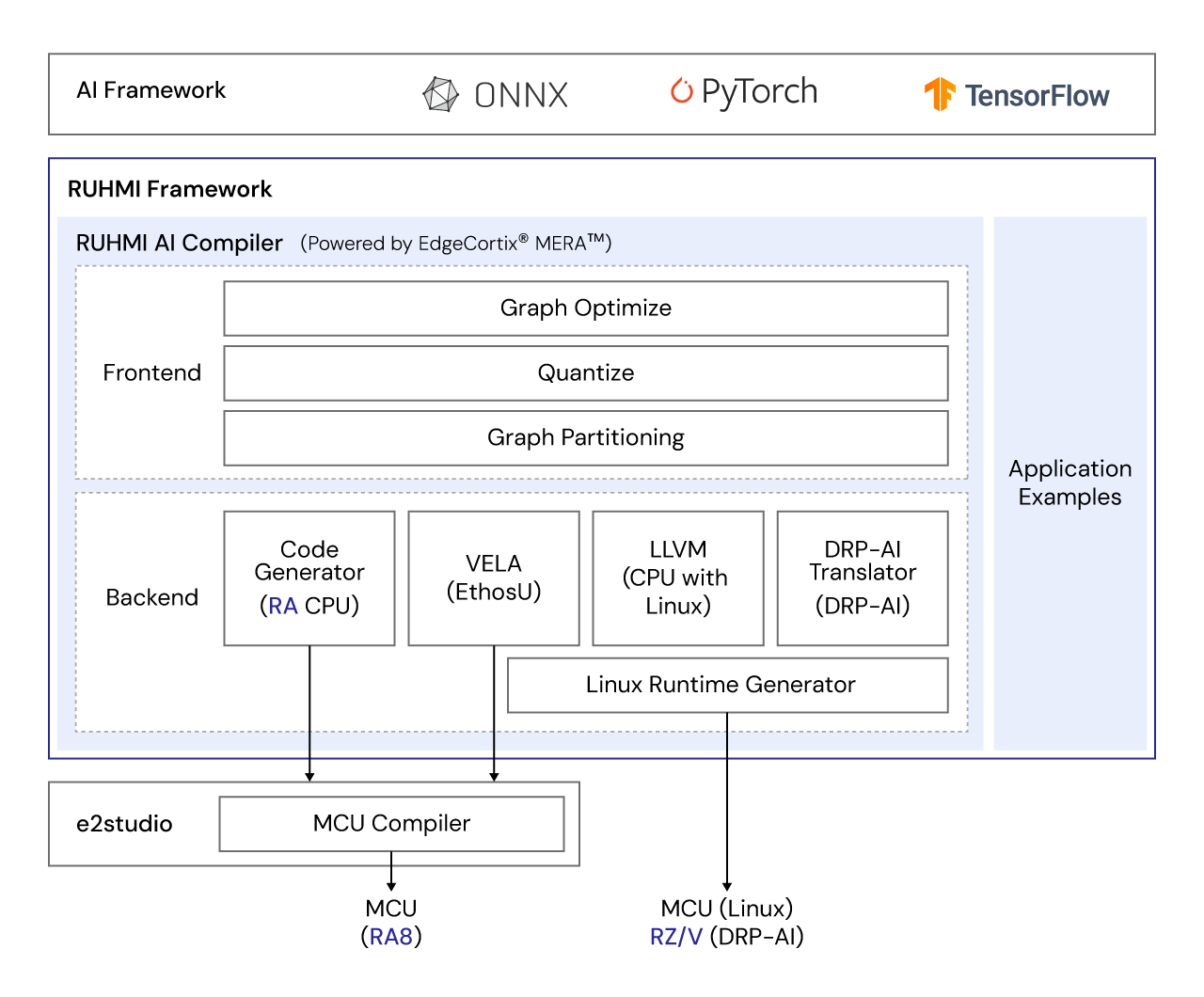
Renesas Robust Unified Heterogenous Model Integration (RUHMI) Framework is a set of tools supporting AI application development for Renesas MCU/MPU products. Generate highly optimized models in minutes to run efficiently on Renesas embedded processors.
Why RUHMI Framework?
With a robust compiler and software framework, our solution enables seamless deployment of the latest neural network models across multiple frameworks. By leveraging a common front-end compiler engine* for Renesas' broad portfolio of AI MCU and MPU products, we deliver enhanced user convenience through standardized frameworks and interfaces, ensuring cross-device compatibility and a consistent development experience.
- Seamless deployment of pre-trained deep neural networks from graph compilation to AI inference using integrated tools, APIs, automated code generation, and runtime support
- Workflow integration and flexible customization through a standardized Python library across Renesas MCU/MPU families
- Native support for leading ML frameworks, with ongoing expansion to enable importing common models across devices
- Framework-independent post-training calibration and quantization for user-defined models
- Multiple application examples, including models optimized for each supported device
- Automatic conversion to optimized embedded code for onboard CPUs (RUHMI feature for MCUs) for simplified deployment
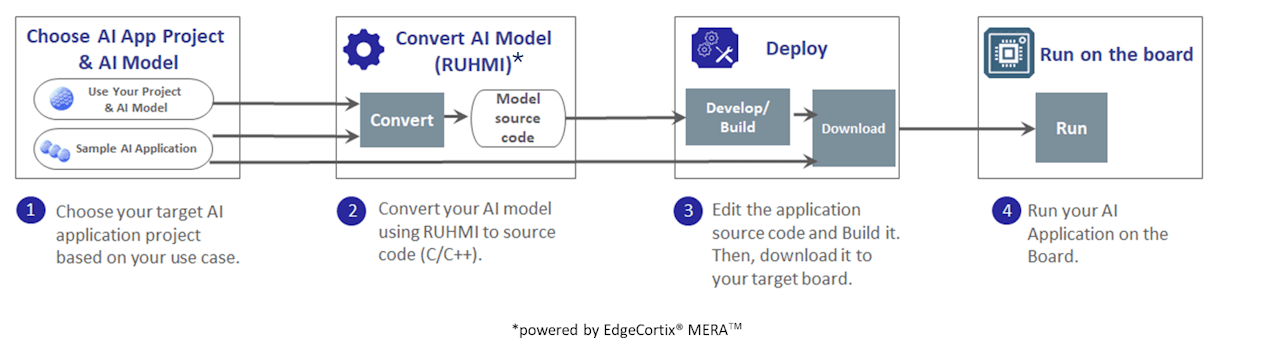
- User-friendly design for smooth model selection, conversion, and storage across supported frameworks and devices
- Highly configurable CLI environment for Linux
- Windows environment with an intuitive GUI and expert-level CLI for MCU implementation, supporting diverse development environments
* Powered by EdgeCortix® MERA™ 2.0
Features
- RA8 MCUs
- Supported frameworks: TensorFlow Lite (.tflite), ONNX (.onnx), PyTorch/ExecuTorch (.pte)
- OS: Windows (GUI, CLI), Linux (CLI)
- RZ/V MPUs
- Supported frameworks: TensorFlow, ONNX, Pytorch
- OS: Linux (CLI)
- RZ/G3E MPU
- Supported frameworks: TensorFlow Lite
- OS: Linux
Release Information
For additional information and links, visit GitHub.
Target Devices
Downloads
|
|
|
|
|---|---|---|
| Type | Title | Date |
| Software & Tools - Software | ||
| Software & Tools - Software | ||
| Software & Tools - Software | ||
3 items
|
||
Documentation
|
|
|
|
|---|---|---|
| Type | Title | Date |
| Quick Start Guide |
PDF
2.59 MB
A practical guide to deploying AI models on Renesas RA MCUs using the RUHMI (Robust Unified Heterogeneous Model Integration) framework. It explains model quantization, compilation, and C/C++ code generation via AI Navigator GUI or CLI, supporting TensorFlow Lite, ONNX, and PyTorch/ExecuTorch with optional Arm Ethos‑U acceleration.
|
|
1 item
|
||
Design & Development
Related Boards & Kits
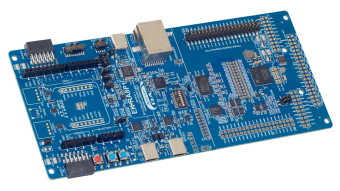
Evaluation Kit for RA8P1 MCU Group
The EK-RA8P1 evaluation kit is designed to enable users to easily evaluate the RA8P1 MCU features and develop embedded system applications using Renesas' Flexible Software Package (FSP) and e2 studio IDE. Users can utilize the rich onboard features and their choice of popular ecosystem add-ons... Read More

RZ/V2H Quad-core Vision AI MPU Evaluation Kit
The RZ/V2H AI MPU evaluation kit (RTK0EF0168C04000BJ) is used to evaluate Renesas' RZ/V2H quad-core vision AI MPU. The kit includes a CPU board and an expansion (EXP) board. It supports RZ/V2H standard software packages and enables easy implementation of software development tasks such as low... Read More
Test This Board Remotely
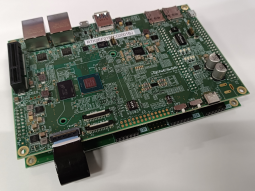
RZ/V2N Quad-core Vision AI MPU Evaluation Kit
The RZ/V2N AI MPU Evaluation Kit V2.0 (RTK0EF0186C03001BJ) is used to evaluate our RZ/V2N quad-core vision AI MPU. The kit includes a CPU board and an expansion board (EXP board). V2.0 adds support for the DDR Suspend to RAM function, and the power supply circuit configuration has been changed... Read More

SMARC SOM Evaluation Kit for RZ/V2L MPU with AI Accelerator
The RZ/V2L Evaluation Board Kit consists of a module board (SOM) and a carrier board that can easily start evaluation of the RZ/V2L. It also includes the MIPI Camera Module (MIPI CSI). The carrier board can be commonly used with RZ/G2L, RZ/G2LC, RZ/G2UL, and RZ/V2L modules (SOM) prepared... Read More
Test This Board Remotely

RZ/V2M Evaluation Board Kit
This product is an evaluation board with RZ/V2M configured as the key device and is capable of easily implementing software development such as camera sensor input image processing, low-power consumption AI inference, video streaming, and etc.
Test This Board Remotely
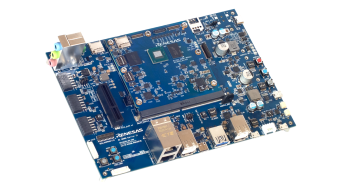
Evaluation Board Kit for RZ/G3E MPU
The RZ/G3E Evaluation Board Kit consists of a module board (SOM) and a carrier board, ideal for evaluating the features of the RZ/G3E MPU. The module board complies with the SMARC v2.1 standard and is a good reference for module board-based product development.
Main Contents:
- RZ/G3E SMARC Module... Read More
Videos & Training
Learn how the Renesas Robust Unified Heterogenous Model Integration (RUHMI) Framework simplifies AI model integration. This tool combines an embedded AI compiler with e2 studio to quickly generate optimized models for Renesas embedded processors, making it ideal for both beginners and experts.
Related Resources
Support
Support Communities
- RUHMI / AI Navigator quantization fails (get_model_info ok) with YOLO-FastestV2 ONNX: MERA fe_onnx_cli crash / model.mir missing
Hello Renesas team,I am working on EK-RA8P1 (RA8P1 + Ethos-U55) and using e² studio AI Navigator / RUHMI Framework to deploy a custom DMS object detection model.White check mark What I am trying to do Run my custom YOLO-FastestV2-based DMS model on RA8P1 Flow: Camera ...
Jan 13, 2026 - RA8P1 EVK – Is there a Renesas-supported development environment to train and build YOLO-Fastest models or any other models for custom datasets?
... fine-tune YOLO-Fastest models for RA8P1 using custom datasets? If not, is the recommended workflow to train YOLO-Fastest externally (for example using standard frameworks such as TensorFlow/PyTorch on PC or cloud) and then use AI Navigator / RUHMI only for INT8 model conversion and deployment to ...
Jan 1, 2026 - EK-RA8P1 - How to disable NPU
... to run AI model on EK-RA8P1. As part of that i have identified one of the sample project from following git repo of Renesasruhmi-framework-mcu/application_examples/image_classification at main · renesas/ruhmi-framework-mcu In my understanding the image classification code in above ...
Mar 19, 2026
Knowledge Base
- How do I convert models for use with Ethos-U55 on RA8P1, using RUHMI?
When using Ethos-U55 on RA8P1, the model optimization and conversion process is carried out in several steps using the RUHMI Framework tool. Model Import: First, the user imports models from TensorFlow or ONNX format into the RUHM tool. RUHMI then converts these models into Intermediate Representation (IR) for further ...
Jul 1, 2025 - Where to find know-errors and workaround for RUHMI AI MCU compiler
... AI MCU compiler? Answer: Renesas maintains a live Known Issues and Workarounds directory within the official GitHub repository. This resource is frequently updated to help users troubleshoot common compilation and setup hurdles.ruhmi-framework-mcu/docs/known_issues at main · renesas/ruhmi-framework-mcu Suitable Products RA8P1
Apr 20, 2026 - How can I profile NPU inference performance and memory usage on RA8P1?
... to the buffer size information included in the generated code. In most cases, the generated code can be used as-is, but you may relocate memory regions as needed depending on your application. For more detail, please refer to RUHMI user's manual in GitHub via RUHMI Framework landing page.
Jul 1, 2025

Support Communities


