
Overview
Description
[Updated: Jul. 21, 2026 Rev. 1.10] [Notes] Emulator and Flash Memory Programmer Products Notice Regarding Changes to Windows Driver Policy (PDF | English, 日本語)
USB driver for countermeasures (For E2, E2Lite, and IE850A only)
The IE850A is equipped with a rich variety of debugging functions, such as events, tracing, and time measurement. This full spec emulator features 9 GB of memory for storing histories of program execution, enabling the saving and checking of histories of program execution over longer periods.

Features
- Collect long-term program execution histories
The emulator has 9 GB of memory for collecting histories of program execution, such as branches and data access. The emulator handles the memory as a set of trace frames, each with a capacity of up to 1 GB. The total capacity allows the saving and checking of histories of program execution over longer periods. - Use IE850A and E2 emulator on the same user system
The IE850A emulator supports devices equipped with the Aurora trace interface, a scalable and lightweight link-layer protocol for high-speed serial communications. Having a 34-pin connector for Aurora protocol communications on the target side, the IE850A can be used to collect histories of program execution over longer periods for use in defect analysis. - An E2 emulator can also be connected to the user system by using a conversion adapter.
You can then use the E2 for standard debugging and the IE850A for debugging that requires close trace analysis. - Rich Variety of Debugging Functions
As a full-spec. emulator, the IE850 is equipped with a rich variety of debugging functions. Along with basic functions such as stepped execution, breaks and RAM monitoring, it also supports time measurement, tracing and measurement of coverage for more efficient system development. - Learn More
Release Information
| Software to be used | Target devices | Operating Environment |
|---|---|---|
| CS+ Evaluation Software Download | RH850 [Details] Functions Supported by CS+ (XLSX) (XLSX | English, 日本語) | Operating Environment |
| e² studio Download | RH850 [Details] Target Devices | |
| Green Hills Multi | RH850 | For the details, contact Green Hills Software. |
Release information (See Tool News)
Target Devices
Design & Development
Videos & Training
This video introduces emulators used in RH850 family microcontroller development. It covers the E2 emulator, an on-chip debug emulator, as well as the IE850A and IE850 full-spec emulators. A comparison table is included to help customers easily determine which emulator best suits their needs. Additionally, the extended functions of the E2 emulator are explained in detail.
Additional Details
Specifications of IE850A Main Unit
| Host machine interface | USB (USB2.0, High-speed / Full-speed) |
|---|---|
| Power supply for emulator | Supplied from the AC adapter separately available |
| Emulator main unit external dimensions (mm) | 165.1(W) x 115.7(D) x 67(H) |
| Emulator main unit weight | Approx. 800 g |
| Conformance with overseas standards | European Standards: EN 55032 Class A, EN 55035 US FCC Standard: FCC part 15 Class A |
Components
- Emulator main unit (IE850A)
- USB interface cable
- Stick for unplugging EA from POD
System Configuration
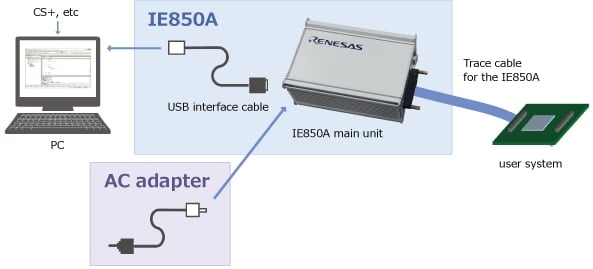
Optional Products (Sold Separately)
Emulation Adapter for RH850 Family
| Emulation Adapter | Target MCUs |
|---|---|
| RTE7702012EAB00000J | RH850/E2UH, RH850/E2H |
| RTE7702200EAB00000J | RH850/U2A16, RH850/U2A8, RH850/U2A6 |
| RTE7702500EAB00000JNote1 | RH850/U2B24, RH850/U2B10, RH850/U2B6 |
| RTE7702500EAB0K000JNote2 | RH850/U2B24, RH850/U2B10 |
| RTE7702600EAB00000J | RH850/U2C8, RH850/U2C4, RH850/U2C2 |
Notes:
- On-board debug chip R7F702Z20ADBG (Performance configuration)
- On-board debug chip R7F702Z2KADBG (Safety configuration)
Refer to List of Emulation Adapter for RH850 Family (PDF | English, 日本語) for more details of the optional products for RH850 Family .
AC adapter
Specifications of the AC adapter for IE850A vary depending on the region. Be sure to use an adapter designed for your region. AC adapter is not bundled with the IE850A.
| Region | Model No. | |
|---|---|---|
| Japan | QB-V850E2-PW-JP | |
| America | QB-V850E2-PW-EA | |
| Europe | QB-V850E2-PW-EE | |
| China | QB-V850E2-PW-CN | |
| Hong Kong | QB-V850E2-PW-HK | The order acceptance has been closed. |
| Korea | QB-V850E2-PW-KR | The order acceptance has been closed. |
| Singapore | QB-V850E2-PW-SG | The order acceptance has been closed. |
Note:
- For use in regions other than those mentioned above, the customer must provide an AC adaptor that conforms to the laws and regulations of the region where the product will be used.
AC adaptor specifications: 15V 4A, DC plug standard: PLUG No.=PL05B (EIAJ No.=EIAJ-5) DC plug outer diameter 6.5mm, inner diameter 4.3mm, centre plus
Trace Cable for the IE850A
You will also need the trace cable for the IE850A to connect it to the target system.
| Product | Model No. |
|---|---|
| Trace cable for the IE850A | RTE0T0850AKCAC0000J |
conversion adapter
| Product | Model No. |
|---|---|
| 34-pin to 46-pin conversion adapter | RTE0T0850AKCA00000J |
Ordering Information
This product can be purchased through the normal sales channels.
| Product Name | Orderable part number |
|---|---|
| IE850A | RTE0T0850AKCT00000J |
Support
Support Communities
- RH850U2A16 JTAG
I am using a E2 emulator and i have a 20pin to 14pin cable connected to a 10pin ARM connector which is plugged into a devkit which has a RH850U2A16 board integrated on it. If i connect with wires, the JTAG dedicated pins, is flashing/debugging gonna work? For ...
Jul 16, 2025 - Unable to Flash R7F702300BFABA-C Using E2 Emulator - Error E300010C
Hi Renesas team, We are trying to flash the R7F702300BFABA-C using E2 emmulator using Renesas Flash Programmer (RFP) V3.24.00 in both CSI and 2- UART interfaces. We are unable to flash the MCU and receives the following error code. RFP reports: "E300010C: Data received from the device ...
Sep 4, 2026 - RH850 U2A: E2 emulator cannot connect after package change (292-pin → 176-pin) – what should I check?
Hello, I’m having an issue connecting an RH850 U2A target with the Renesas E2 emulator (e2 studio / GDB Server). This used to work on our previous setup, but after moving from a 292-pin(RH850 U2A6 Ev board) package to a 176-pin package(custom board), the debugger ...
Feb 25, 2026
Knowledge Base
- The board does not work when emulator is disconnected [RH850]
First, refer to “Notes on differences in operation between the actual device and the emulator” in the E2 Emulator Additional Document for User’s manual (published for each device).Please look for “Initialization of RAM areas”.One of the probable causes of a board not working alone but working with ...
Jul 30, 2024 - Differences between e² studio and CS+ Integrated Development Environments
... Support coverage varies by device.) e² studio CS+ (CS+ for CC) CS+ (CS+ for CA,CX) E2, E2 emulator Lite,E1*, E20,Segger J-Link,IE850A, IECUBE E2, E2 emulator Lite,E1*, E20,IE850A, IECUBE,IE850(prev. IECUBE2) E2 emulator Lite,E1*, E20,MINICUBE2(QB-MINI2)*,EZ Emulator, IE850A, IECUBE ...
Oct 9, 2024 - On board COM port debugger not recognized in Linux version of e² studio
... idProduct}=="823c", ATTR{idVendor}=="045b", MODE="666"ATTR{idProduct}=="0250", ATTR{idVendor}=="045b", MODE="666"# Prevent E2/E2Lite/E1/E20/IE850A from being captured by modem manager service as E2/E2 Lite/E1/E20/IE850A is not a modemATTR{idProduct}=="82a1 ...
Jul 30, 2024

Support Communities

